

English
LED Linear Grow Light Manual
Overview
1 FT
2 FT

Products Applicable
| Product | SKU |
|---|---|
LED Linear Grow Light Black 1ft CTR |
VSL-T5B1WC4 |
LED Linear Grow Light Black 1ft CTR |
VSL-T5B1WC8 |
LED Linear Grow Light Black 2ft CTR |
VSL-T5B2WC4 |
LED Linear Grow Light Black 2ft CTR |
VSL-T5B2WC8 |
Product Contents
| Image | Name | VSL-T5B1WC4/VSL-T5B2WC4 | VSL-T5B1WC8/VSL-T5B2WC8 |
|---|---|---|---|
|
Screws |
8 pcs |
16 pcs |
|
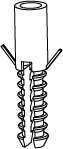
Wall Anchors |
8 pcs |
16 pcs |
|
Zip Ties |
8 pcs |
16 pcs |
|
Clips |
8 pcs |
16 pcs |
|
Double-Sided Tape |
8 pcs |
16 pcs |
|
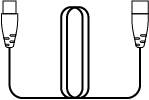
Extension Cable |
3 pcs |
7 pcs |
|
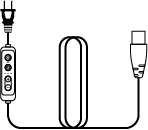
Power Cable |
1 pc |
2 pcs |




Specifications
| SKU | VSL-T5B1WC4 | VSL-T5B1WC8 | VSL-T5B2WC4 | VSL-T5B2WC8 | VSL-T5B1WC4-EU | VSL-T5B1WC8-EU | VSL-T5B2WC4-EU | VSL-T5B2WC8-EU |
|---|---|---|---|---|---|---|---|---|
Number of Lights |
4 |
8 |
4 |
8 |
4 |
8 |
4 |
8 |
Wattage /Bar |
7W |
7W |
15W |
15W |
7W |
7W |
15W |
15W |
Total Wattage |
28W |
56W |
60W |
120W |
28W |
56W |
60W |
120W |
Voltage |
120V/60HZ |
220-240V/50HZ |
||||||
Using the In-Line Controls
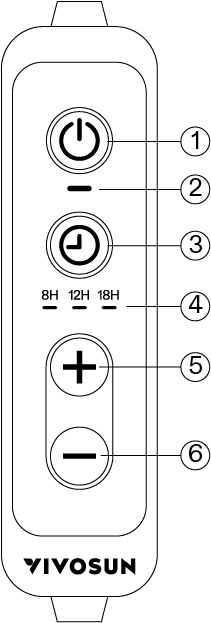
① |
Power Button |
④ |
Timer Indicator Light |
② |
Power Indicator Light |
⑤ |
Brightness + |
③ |
Timer Button |
⑥ |
Brightness - |
Three Timer Settings: 8H/12H/18H
Timer has not Started: All timer indicator lights turn on
Power On: The power indicator light turns on
Power Off: The power indicator light turns off
Brightness: Four brightness levels can be selected. Press the "+" button to increase brightness and the "-" button to decrease it.
Timer Settings
8-Hour: Press the timer button once and the 8-hour indicator light will turn on.
12-Hour: Press the timer button twice and the 12-hour indicator light will turn on.
18-Hour: Press the timer button three times and the 18-hour indicator light will turn on.
How to Set Up a 24-Hour Cycle
Example: If the timer is set to 8 hours at 5 PM, the light will stay on until 1 AM, then automatically turn on again at 5 PM the next day, following the same 8-hour cycle. This will repeat daily until the power is cut or the timer is manually changed. The same logic applies to the 12-hour and 18-hour settings.
Brightness Memory After Power Loss
After a power outage, turning the light back on will restore the previously set brightness level.
Timer Memory After Power Loss
After a power outage and restart, the memory function is cleared and the timer settings must be reset.
Installation
Three Installation Methods
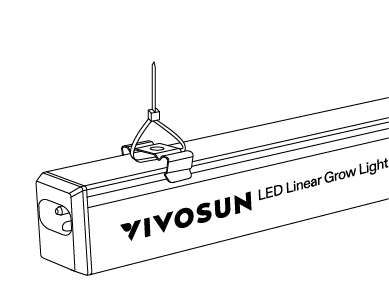
Method 1: Zip Tie + Clip
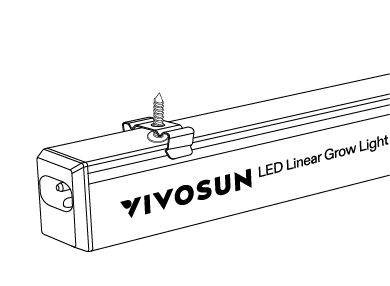
Method 2: Clip + Screw
Method 3: Double-Sided Tape

Direct Light-to-Light Connection
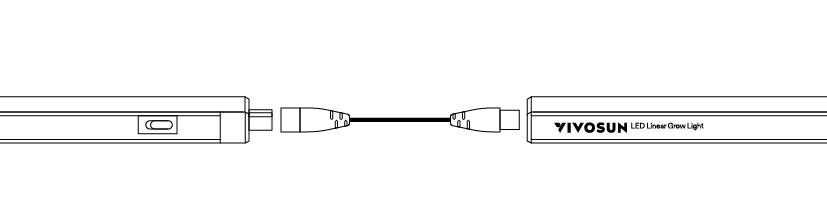
Lamp Body is Directly Connected
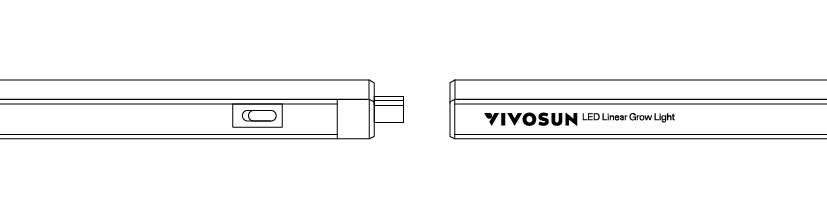
*NOTE*: Daisy-chaining supports up to 8 bars
Make sure the power cord is unplugged before installation.
Ensure the power cable and light switches are turned off. Connect the power cable and light first, then supply power.
Step 1

Step 2
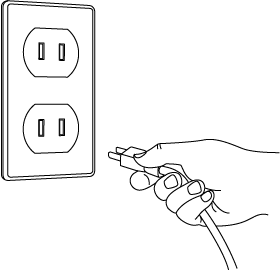
Step 3
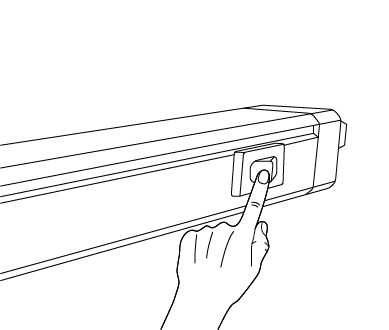
Before using the device, connect it to power, then turn on the switch.
Warranty
VIVOSUN offers a 2-year limited warranty on this product purchased directly from us or our authorized dealers, beginning on the original date of purchase.
This warranty is provided in addition to, and does not affect, your statutory rights under applicable consumer protection laws in the country where the product was purchased.
For the full Warranty Policy, please visit: https://www.vivosun.com/help/warranty-policy
Alternatively, you may contact customer service at support@vivosun.com / +1 888-505-8486.
Warning
-
This appliance can be used by children aged 8 years and above, as well as by individuals with reduced physical, sensory, or mental capabilities, or those lacking experience and knowledge, provided they have been supervised or instructed on the safe use of the appliance and understand the associated hazards
-
Children should not play with the appliance
-
User maintenance should not be carried out by children without supervision
-
Keep the appliance and its cord out of reach of children under 8 years old
-
If the power cable is damaged, it must be replaced by the manufacturer, its service agent, or similarly qualified persons to avoid hazards
-
Never touch the plug or outlet with wet hands
-
Use only the cables provided with the device
-
Acceptable operating temperatures range from -20°C to 40°C (-4°F to 104°F)
-
Avoid looking directly at the lights when they are turned on
-
Avoid touching the LED diodes when adjusting the light
-
Do not use water or any detergent to clean the product

DO NOT dispose of this product with your regular trash. Electrical appliances contain hazardous materials that can harm the environment if not disposed of properly.
Please contact your local authorities for information on nearby drop-off centers or recycling programs that accept electronic waste.
Contents

We help you grow your best green.

We provide the highest quality.

We relentlessly pursue the future.

We make growing more enjoyable.

We support every grower.
Sign up and get 8% off your first order
©2026 Vivosun All Rights Reserved